|
Payments and how to activate your New Class
After creating a class and adding students to it, it will be added to the list of classes. However, it will be shown as "INACTIVE" until the class payment has been made.
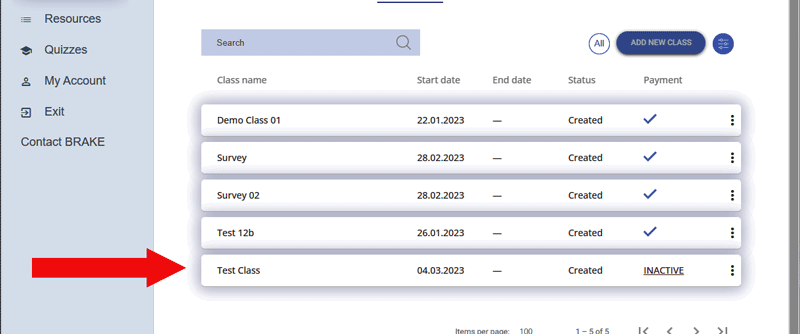
To fully activate your class, click on the class row to bring up the class detail screen.
Click on the activate button.
This will open your classes student list. Here you can all student enrolled in the class and edit their details.
Press the "Activate" button to finalise the class details and prepare the BRAKE Driver Awareness teaching modules.
.jpg)
This takes you to the payment system with the fee for your class.
.svg)
There are two ways to pay:
1.You can use pre-paid places.
2.You can pay for student places by card.
School Admin BOS accounts are the only accounts that can purchase pre-paid places.
If your school admin has already purchased pre-paid places for you, you will see the number of available places to use next to pre-paid places.
.svg)
If there are available places for your students, click on the blue "use pre-paid places" button to pay.
Pre-paid places are most convenient for you. If you wish to have pre-paid places, talk to the BOS School Admin from your school.
The second payment method is to pay by card.
Click on the "pay by card" option.
.svg)
This will take you to a secure online payment system using Stripe.
Enter your email, card information and country.
.svg)
While selecting the option to save your information is convenient, we recommend that you never allow access to websites to know or store your banking details.
Once you have entered the required information, press pay.
Once your payment is successful you will be taken back to your classes homepage and Module 1 will be available for you to begin.
|

