|
Teacher: How to navigate the Teaching Modules
We encourage you to take our Teacher Accreditation course before you begin teaching Module One. The accreditation course can be found on the BRAKE website.
BOS modules are designed to be used by modern web browsers on PCs and Macs. It works well with:
Chrome
Firefox and
Edge
But out-of-date older browsers should be avoided – especially Internet Explorer and older versions of the Mac Safari browser.
Once you have added students and activated the class, Module One is ready to begin.
You will be able to preview each module if you need to.
Click Start to begin Module One.
.svg)
The Module will display as a full-screen page. If the page is minimised from full screen, it will revert to your classes' homepage.
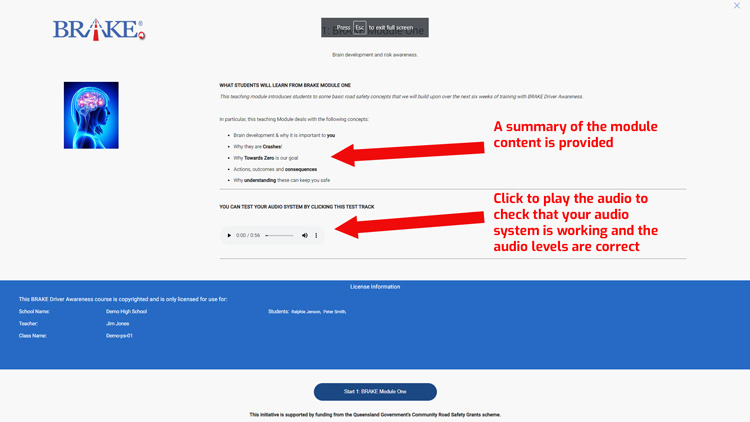
At the bottom of the first module slide, select the blue "Start 1: BRAKE Module One" button to continue.
The next page lists the students eligible to participate in this Module under copyright laws.
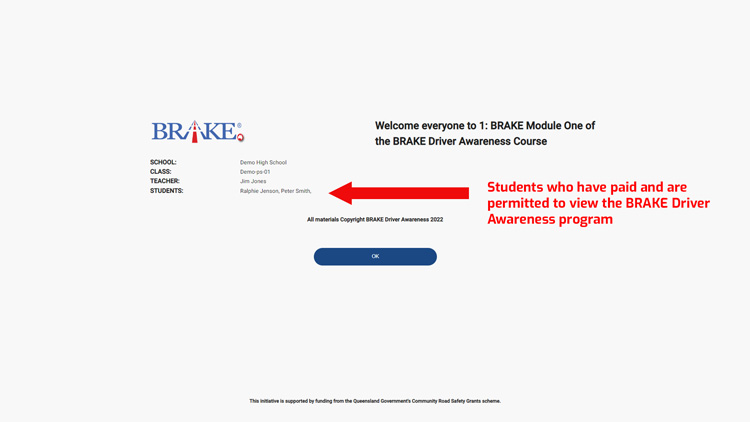
Press "OK" if this information is correct. If the student list is incorrect or incomplete, please contact BRAKE.
.svg)
You will notice three buttons on the top left of your screen.
The risk estimator is an interactive tool to analyse and make estimates of potential risk. There is a help section on how to use the Risk Estimator Tool.
Use the pause button to pause the module if you need to use another page.
You will be taken out of the presentation and back to your class homepage when you press Pause.
When you are ready to begin the Module again, complete the same process as you did to start the Module.
You will start the Module from the point at which you paused. You will not be able to go back to previous slides before this current slide, as it is your new starting point.
The third button is the finished button. You will use this once you have completed the Module.
You can progress through the Module with the arrows pointing to the right and go backwards with the arrow on the left. You can also use your keyboard arrow keys and page up and down keys.
Modules can only be completed once per class.
After using the finish button, that Module becomes unavailable, and the next Module becomes available.
When you complete the Module, press the finished button in the top menu, then select "Finish 1: BRAKE Module One".
Module One is now complete and module two will be available.
This initiative is supported by funding from the
Queensland Government's Community Road Safety Grants scheme.
|

